Cách xuất âm thanh từ Read PDF Aloud
Tìm hiểu cách tải xuống phần đọc to tài liệu PDF của bạn dưới dạng tệp MP3 để nghe ngoại tuyến.
Nghe tài liệu PDF là một cách tiếp nhận thông tin rất hay, nhưng nếu bạn muốn nghe khi đang ngoại tuyến, trên đường đi làm, hay đơn giản là không ngồi trước máy tính thì sao? Với Read PDF Aloud, bạn có thể dễ dàng xuất phần đọc to của bất kỳ tệp PDF nào về thiết bị của mình.
Dưới đây là hướng dẫn từng bước để xuất âm thanh bằng công cụ của chúng tôi.
Vì sao nên xuất âm thanh?
- Nghe ngoại tuyến: Nghe tài liệu của bạn mà không cần kết nối internet.
- Dễ dàng mang theo: Chuyển âm thanh sang điện thoại, máy tính bảng hoặc trình phát MP3 chuyên dụng.
- Trải nghiệm podcast: Biến danh sách đọc của bạn thành một playlist podcast riêng.
Hướng dẫn từng bước
1. Tải PDF của bạn lên
Trước tiên, truy cập Trình đọc Read PDF Aloud. Bấm vào vùng tải lên hoặc kéo thả tệp PDF của bạn để đưa vào trình đọc.
2. Chọn giọng đọc ưa thích
Trước khi xuất, bạn có thể chọn giọng đọc và ngôn ngữ nghe ưng ý nhất. Công cụ của chúng tôi hỗ trợ hơn 140 ngôn ngữ cùng nhiều lựa chọn giọng đọc. Hãy phát thử một đoạn nhỏ để chắc chắn bạn hài lòng với tốc độ và tông giọng.
3. Bấm nút tải xuống
Khi tệp đã được tải lên và bạn sẵn sàng xuất, hãy tìm nút Tải xuống trên thanh điều khiển trình phát âm thanh ở dưới cùng màn hình.
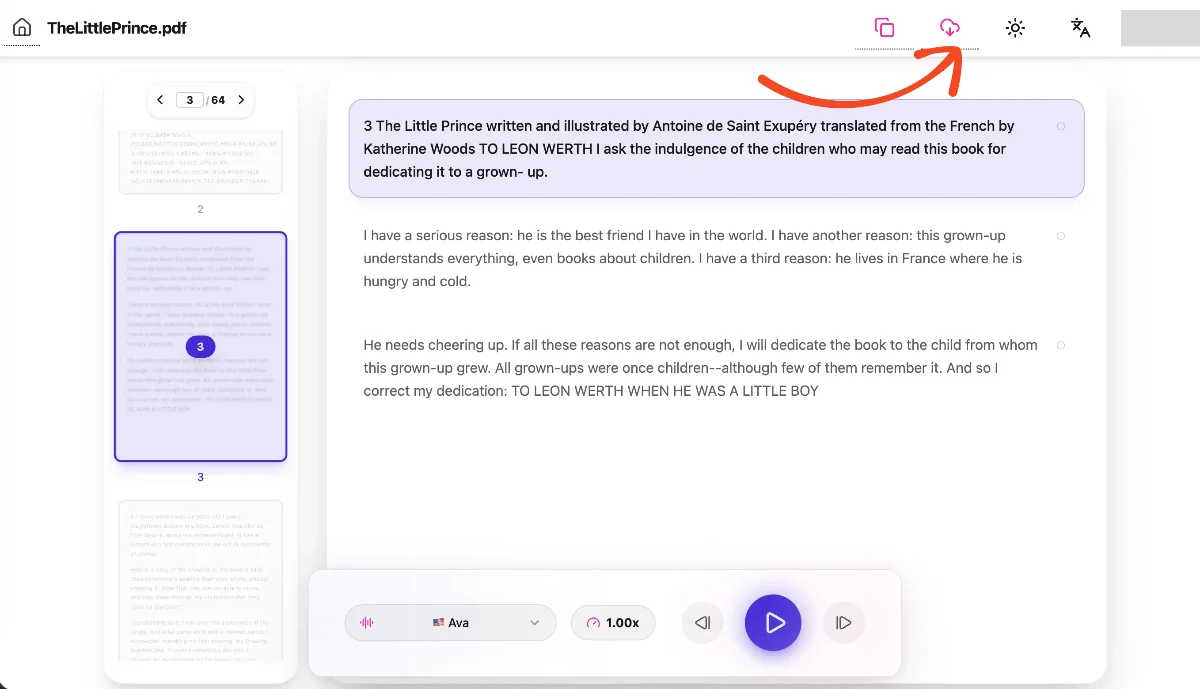
- Nút này có hình viên thuốc và mang biểu tượng tải xuống đám mây.
- Nó nằm cạnh các nút điều khiển phát văn bản.
Khi bạn bấm nút, hệ thống sẽ bắt đầu xử lý âm thanh. Bạn sẽ thấy vòng xoay đang tải cho biết âm thanh đang được tạo.
4. Lưu tệp của bạn
Sau khi xử lý xong, quá trình tải xuống sẽ tự động bắt đầu. Tệp sẽ được lưu dưới dạng MP3, giữ nguyên tên gốc của tài liệu PDF để dễ quản lý.
Ví dụ, nếu tệp của bạn có tên research-paper.pdf, tệp âm thanh tải xuống sẽ được lưu là research-paper.mp3.
Mẹo để có kết quả tốt nhất
- Kết nối internet: Vì âm thanh được tạo bằng giọng AI chất lượng cao, kết nối internet ổn định giúp quá trình xử lý nhanh nhất.
- Quản lý tệp: Các tệp MP3 tải xuống tương thích với hầu hết trình phát phương tiện trên điện thoại (iOS và Android) và máy tính.
Hãy bắt đầu chuyển tài liệu của bạn thành âm thanh di động ngay hôm nay và tận dụng tối đa thời gian của mình!